


On 12 August 2026, Amazon EKS started letting you set parameters on the control plane components it manages for you: the API server, the scheduler and the controller manager. Four parameters at launch. The list is short, and the first entry changes what your cluster costs.
Until now, changing how pods are scored onto nodes on EKS meant running a second scheduler beside the one AWS operates and keeping it alive across upgrades. Most teams decided that was not worth owning and lived with the upstream default. That default has a cost.
What LeastAllocated costs you
The scheduler places a pod in two phases. It filters the nodes that can run the pod at all, then scores the survivors and picks the highest. The nodeResourcesFit plugin does the resource half of that scoring, and its strategy decides which way the ranking leans.
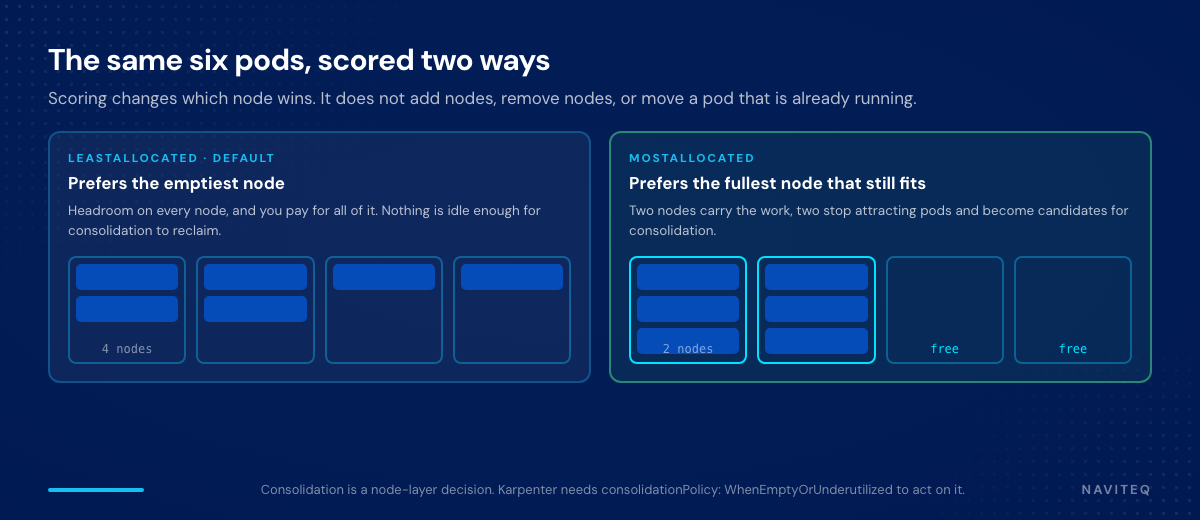
LeastAllocated, the default on every EKS cluster ever created, favours the emptiest node. That is reasonable when existing pods grow in place and you want room for them. It is also why a cluster can sit at 40% allocation across twenty nodes and still provision a twenty-first. MostAllocated inverts it: the busiest node that still fits wins, the same workloads occupy fewer nodes, and the ones left lightly used stop attracting new pods so a consolidating node layer can retire them.
The four parameters
| Component | Parameter | Supported values | Default | Provisioned Control Plane |
|---|---|---|---|---|
| kube-scheduler | nodeResourcesFit.scoringStrategy | LeastAllocated, MostAllocated | LeastAllocated, cpu: 1, memory: 1 | No |
| kube-controller-manager | horizontalPodAutoscalerSyncPeriod | 10s to 15s | 15s | Yes |
| kube-apiserver | eventTtl | 10m to 60m | 60m | No |
| kube-apiserver | serviceNodePortRange | minPort and maxPort between 10260 and 32767 | 30000 to 32767 | No |
Kubernetes 1.31 or later, every commercial Region plus GovCloud and China, no additional charge. Console, eksctl, CLI, API, CloudFormation and CDK work at launch. The upstream RequestedToCapacityRatio strategy is not supported.
Turning on bin packing
# bash
aws eks update-cluster-config \
  --name "$CLUSTER" \
  --kube-scheduler-config '{
    "nodeResourcesFit": {
      "scoringStrategy": {
        "type": "MostAllocated"
      }
    }
  }'
The call returns before anything has changed. EKS applies the new configuration through a rolling update of the control plane, which takes several minutes and moves the cluster out of ACTIVE and back again. Track it, or block on it:
# bash
aws eks describe-update --name "$CLUSTER" --update-id "$UPDATE_ID" \
  --query 'update.{type:type,status:status}'
# { "type": "ControlPlaneComponentConfigUpdate", "status": "InProgress" }

aws eks wait cluster-active --name "$CLUSTER"
Read back what is actually running. describe-cluster returns the full configuration, including the parameters you never touched and the defaults behind them, which makes it the honest thing to assert against in a drift check:
# bash
aws eks describe-cluster --name "$CLUSTER" \
  --query 'cluster.{sched:kubeSchedulerConfig,api:kubeApiServerConfig,kcm:kubeControllerManagerConfig}'

# and the source of truth for what a given version allows:
aws eks describe-cluster-versions --cluster-versions 1.34 \
  --query 'clusterVersions[0].controlPlaneComponentConfig'
Weighting the resource that is actually scarce
The scoring strategy takes an optional resources array. Five resource names are allowed, each with a weight from 1 to 100: cpu, memory, nvidia.com/gpu, aws.amazon.com/neuron and aws.amazon.com/neuroncore. On a fleet where accelerators are the constraint and CPU is abundant, weighting the accelerator is the whole point.
# bash
aws eks update-cluster-config \
  --name "$CLUSTER" \
  --kube-scheduler-config '{
    "nodeResourcesFit": {
      "scoringStrategy": {
        "type": "MostAllocated",
        "resources": [
          { "name": "nvidia.com/gpu", "weight": 100 },
          { "name": "cpu",            "weight": 10  },
          { "name": "memory",         "weight": 10  }
        ]
      }
    }
  }'
Two things about that array bite people. Weights are relative rather than absolute, so cpu: 100 next to memory: 1 does not make the scheduler ignore memory. It weighs CPU a hundred times more heavily, and when every candidate node has identical CPU availability the ranking falls through to memory anyway.
Leaving a resource out is not the same as giving it a small weight. Once you specify the array, only what you listed is scored at all. cpu: 100 with no memory entry ranks nodes on CPU alone and memory stops influencing placement. To keep a resource in the calculation while damping it, list it at a low weight.
The three accelerator resources are scored only when a device plugin advertises them to the kubelet. A driver alone does not make them visible, and anything scheduled through Dynamic Resource Allocation goes through a different plugin, so DRA workloads are unaffected.
Scoring decides where a pod lands among the nodes you already have. It provisions nothing and it retires nothing.
The other three
Event retention is the quiet win for high-churn clusters. Batch jobs, CI pipelines and CronJobs generate events that sit in etcd for an hour by default, competing for space with the objects the cluster needs and slowing list operations.
# bash
aws eks update-cluster-config --name "$CLUSTER" \
  --kube-api-server-config '{ "eventTtl": "15m" }'

# migrating an app that expects a fixed port, without a proxy in front of it
aws eks update-cluster-config --name "$CLUSTER" \
  --kube-api-server-config '{
    "serviceNodePortRange": { "minPort": 10260, "maxPort": 32767 }
  }'
The bounds are not arbitrary. 10260 clears the kubelet health port on 10248 and the kube-proxy health check on 10256; 32767 keeps the range out of the Linux ephemeral range that usually starts at 32768, where the kernel could otherwise pick a NodePort for an outbound connection.
The HPA sync period carries a prerequisite and an exit cost. It requires Provisioned Control Plane, and once set to anything other than 15s the cluster cannot move back to Standard mode until you set it back.
# bash
# count the objects the controller has to work through first
kubectl get hpa --all-namespaces --no-headers | wc -l

aws eks update-cluster-config --name "$CLUSTER" \
  --kube-controller-manager-config '{
    "horizontalPodAutoscalerControllerConfig": {
      "horizontalPodAutoscalerSyncPeriod": "10s"
    }
  }'
Count first, because a shorter period gives the controller less time for the same queue. Going from 15s to 10s drops the number of HPA objects a cluster can reconcile on schedule by roughly a third. EKS does not validate that, and crossing the line fails silently: some objects miss their turn and autoscaling gets slower, the opposite of what you asked for.
What packing does not do
- It does not move running pods. The scheduler never relocates a pod that is already placed. Flipping the strategy changes future decisions only, so a cluster of long-lived deployments looks identical the next morning. Rebalancing means evicting or restarting.
- It does not change filtering. A pod that does not fit on a node still will not be scheduled there. Affinity, taints and tolerations keep their precedence.
- It concentrates blast radius. Fewer nodes carrying the same pods means an unhealthy instance, a retirement or an AZ event takes more of your workload with it. Check your PodDisruptionBudgets and topology spread constraints before, not after.
- It does not provision or retire capacity. Scoring and node management are different layers. If Karpenter is configured with
consolidationPolicy: WhenEmpty, packing produces half-empty nodes that nothing removes and the bill does not move.WhenEmptyOrUnderutilizedis what turns tighter packing into fewer instances. - It can create Pending pods. Under high churn, dense nodes fill faster and pods wait while capacity is provisioned. Workloads that spike hard want headroom on the node they land on, which is what this setting takes away.
The Karpenter side is one field, and it is the field that decides whether any of this reaches the invoice:
# yaml
apiVersion: karpenter.sh/v1
kind: NodePool
spec:
  disruption:
    consolidationPolicy: WhenEmptyOrUnderutilized   # not WhenEmpty
    consolidateAfter: 1m
    budgets:
      - nodes: "10%"
Two operational details belong in the runbook now. There is no reset operation, so returning to stock means setting the default explicitly rather than omitting the field. And eventTtl applies only to events created after the change, because expiry is stamped at creation, so storage pressure eases gradually.
How we would roll this out
This is a cluster-wide, asynchronous change to a component no git revert can undo. Apply it on a non-production cluster carrying representative workloads, restart a deployment to force rescheduling, then watch allocation and node count across a full traffic cycle rather than for ten minutes:
# bash: requested CPU per node, before and after
kubectl get pods -A -o json | jq -r '
  .items[] | select(.status.phase=="Running")
  | [.spec.nodeName,
     ([.spec.containers[].resources.requests.cpu // "0"] | join("+"))]
  | @tsv' | sort | uniq -c

kubectl get nodes --no-headers | wc -l
One caveat for everything-as-code shops, and it is a real one. Terraform and AWS Controllers for Kubernetes support is listed as coming soon, so today this parameter sits outside the state file that owns the rest of your cluster. Until the provider catches up, pin it in a scripted step with a describe-cluster assertion behind it, and treat the gap as a tracked exception with an owner rather than as a CLI call somebody once ran.
Self-managed Kubernetes never had this problem. On the on-prem k3s clusters we deploy through Ansible, scheduler configuration is a file we own, versioned with everything else. The argument about when packing is right was always the same argument. What is new on EKS is that the answer is a supported parameter instead of a second scheduler to keep alive.
Facing this on your stack? Naviteq’s senior platform team does this for SaaS, FinTech, and Enterprise teams across the US, EU, and Israel. Let’s talk.
Naviteq. DevOps, FinOps and AI-driven cloud automation, delivered at scale.