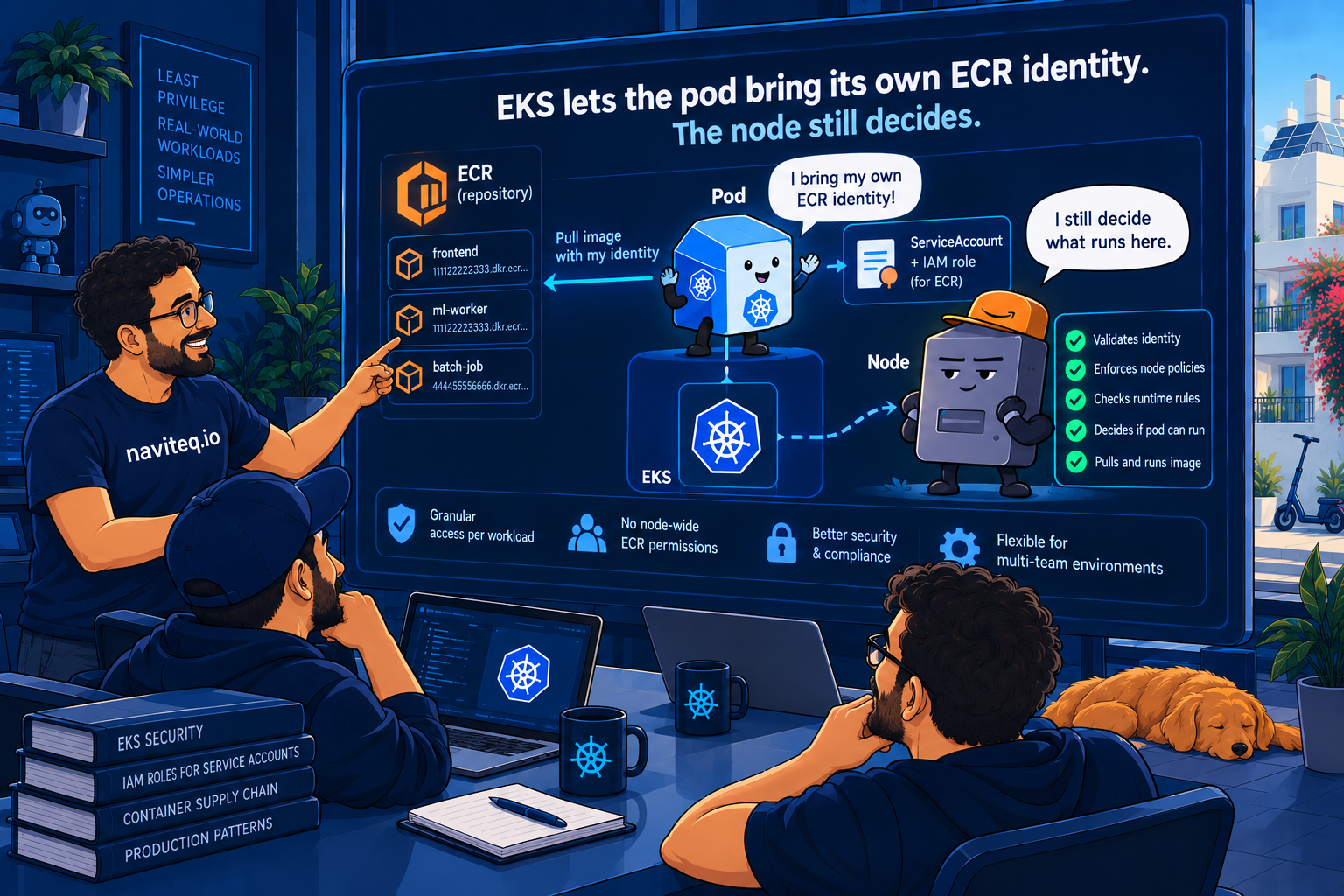

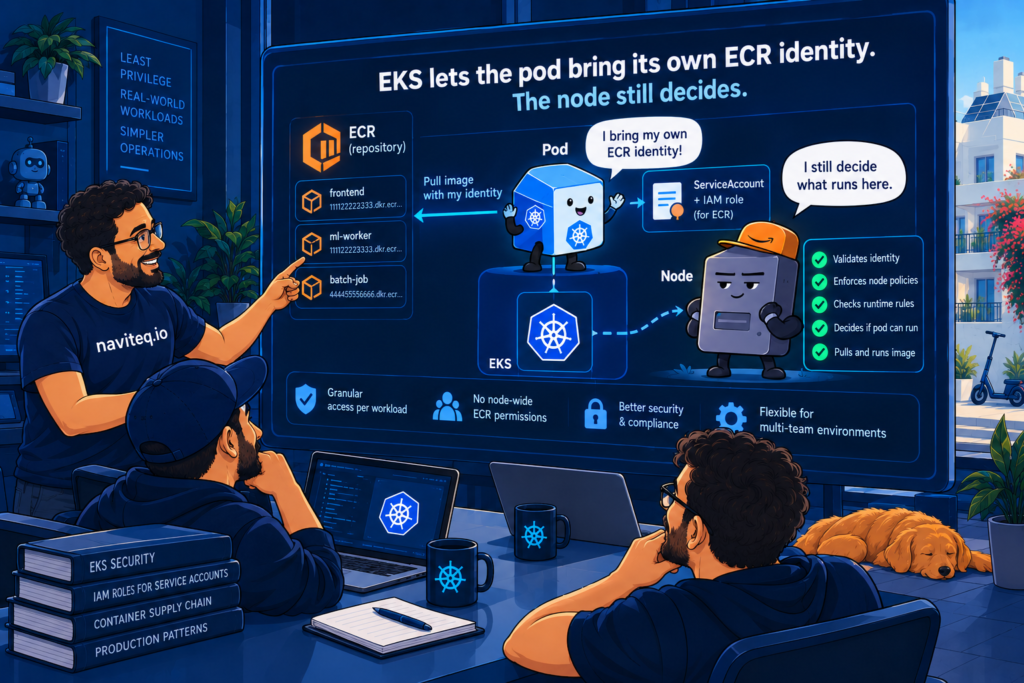
In December 2015 someone opened kubernetes#18787, “Kubelet should enforce access to images after they’ve already been pulled to a node”. Once an image is on a node, any pod scheduled there can run it, whether or not it holds credentials for the registry. The issue was closed in April 2025. For most of that decade, the identity that pulled your images on EKS was the node.
That changed on 22 September, when AWS documented per-pod ECR pull permissions for EKS 1.35 and later. A pod can now pull with an IAM role taken from its service account, and the ECR repository policy decides what that role may pull. It is a real improvement. It also gives the platform team a choice it did not have before, and the node is still part of the answer.
Why the node was the boundary
Every EKS node has an IAM role, and the kubelet uses it for everything needed to start containers, including pulling from ECR. The node role usually carries AmazonEC2ContainerRegistryPullOnly, and the image pull path knows nothing about namespaces, labels or service accounts. On a shared cluster, team A’s pods can pull team B’s images, because both teams’ pods pull as the same machine.
The workarounds were all heavy: admission policies that inspect image references, a third-party policy engine, or a node group per team so that the node role becomes the team role. The last one works and costs you bin-packing, which is the reason you run a shared cluster in the first place.
How per-pod pulls work
Two pieces make this work, one upstream and one from AWS. KEP-4412 lets the kubelet hand a credential provider plugin a service account token bound to the pod. It went alpha in 1.33 and beta in 1.34 behind the KubeletServiceAccountTokenForCredentialProviders gate, and its kep.yaml targets stable for 1.38. On the AWS side, ecr-credential-provider gained full support, including fallback to the node role, in v1.35, which is why AWS draws the line at EKS 1.35.
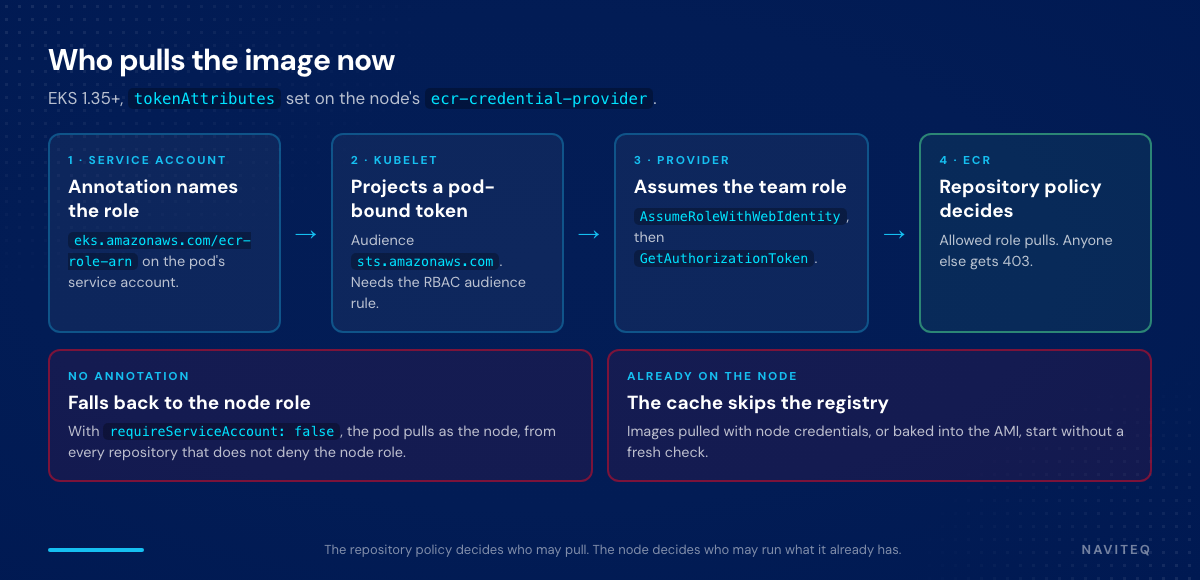
The flow: the pod’s service account carries eks.amazonaws.com/ecr-role-arn. The kubelet projects a token with the sts.amazonaws.com audience and passes it to the provider together with that annotation. The provider calls AssumeRoleWithWebIdentity, then GetAuthorizationToken with the team role’s credentials, and ECR evaluates the repository policy against that role. This is the same mechanism as IRSA, pointed at a different question. IRSA’s eks.amazonaws.com/role-arn scopes what the running application can do. The ECR pull role scopes which image the pod is allowed to start from.
The choice the rollout forces
Three fields in the provider’s tokenAttributes decide what happens to a pod that has no annotation, and each setting has a cost.
| Setting | Pod without the annotation | What it costs |
|---|---|---|
requireServiceAccount: false, node role keeps ECR pull, no repository Deny | Pulls as the node, from any repository | Isolation is opt-in. The pod you worry about is the one that skips the annotation. |
requireServiceAccount: false, repository policy denies everything except listed principals | Pulls as the node, and gets 403 on protected repositories | Every unannotated job, CronJob or debug pod that pulls from those repositories fails on its next start. |
requireServiceAccount: true with requiredServiceAccountAnnotationKeys | The kubelet does not call the plugin and the pull fails | Applies to every image matched by the provider, including the add-ons you mirror into your own ECR. Too blunt for a mixed cluster. |
The middle row is where we would land on a shared cluster, reached team by team rather than in one change. The rest of this article is that rollout.
Step 1: the RBAC rule before any node joins
The kubelet must be allowed to request tokens for the STS audience. KEP-4412 pairs the kubelet gate with ServiceAccountNodeAudienceRestriction on the API server, which checks a synthetic verb before issuing the token. AWS is explicit about the failure mode: without this rule the kubelet cannot project tokens, every image pull fails, and nodes never become Ready. Apply it before the first node with the new provider config boots.
# yaml
apiVersion: rbac.authorization.k8s.io/v1
kind: ClusterRole
metadata:
  name: kubelet-ecr-sts-audience
rules:
  - apiGroups: [""]
    verbs: ["request-serviceaccounts-token-audience"]
    resources: ["sts.amazonaws.com"]
---
apiVersion: rbac.authorization.k8s.io/v1
kind: ClusterRoleBinding
metadata:
  name: kubelet-ecr-sts-audience
roleRef:
  apiGroup: rbac.authorization.k8s.io
  kind: ClusterRole
  name: kubelet-ecr-sts-audience
subjects:
  - apiGroup: rbac.authorization.k8s.io
    kind: Group
    name: system:nodes
Step 2: the provider config on the node
EKS nodes ship ecr-credential-provider with a baseline config at /etc/eks/image-credential-provider/config.json. The change is one block, tokenAttributes, added to the existing provider entry. For managed node groups it goes into the launch template user data. With Karpenter it goes into the EC2NodeClass, where AL2023 accepts MIME multipart user data and merges it with its own. The matchImages list below is shortened to the commercial-region patterns; keep the full list your AMI ships with.
# yaml (Karpenter EC2NodeClass, AL2023)
apiVersion: karpenter.k8s.aws/v1
kind: EC2NodeClass
metadata:
  name: shared
spec:
  amiSelectorTerms:
    - alias: al2023@latest   # pin a version in production
  userData: |
    MIME-Version: 1.0
    Content-Type: multipart/mixed; boundary="//"

    --//
    Content-Type: text/x-shellscript; charset="us-ascii"

    #!/bin/bash
    cat > /etc/eks/image-credential-provider/config.json <<'CONFIG'
    {
      "apiVersion": "kubelet.config.k8s.io/v1",
      "kind": "CredentialProviderConfig",
      "providers": [{
        "name": "ecr-credential-provider",
        "apiVersion": "credentialprovider.kubelet.k8s.io/v1",
        "matchImages": ["*.dkr.ecr.*.amazonaws.com", "*.dkr-ecr.*.on.aws",
                        "public.ecr.aws", "ecr-public.aws.com"],
        "defaultCacheDuration": "12h0m0s",
        "tokenAttributes": {
          "serviceAccountTokenAudience": "sts.amazonaws.com",
          "cacheType": "ServiceAccount",
          "requireServiceAccount": false,
          "optionalServiceAccountAnnotationKeys": ["eks.amazonaws.com/ecr-role-arn"]
        }
      }]
    }
    CONFIG
    --//--
cacheType: ServiceAccount means every pod using the same service account shares the cached credentials, which is what you want when the role depends only on the service account. Bottlerocket configures the provider through its settings API rather than this file. We did not find a tokenAttributes equivalent there at the time of writing, so check its settings reference before you plan a Bottlerocket fleet around this.
Step 3: one pull role per namespace
The trust policy uses the cluster’s OIDC provider and scopes the subject to the namespace, which is the natural tenant boundary on a shared cluster. The permissions are the same managed policy the node role carries, so a team’s pull role is no wider than the node’s was.
# terraform
data "aws_iam_policy_document" "ecr_pull_trust" {
  statement {
    actions = ["sts:AssumeRoleWithWebIdentity"]
    principals {
      type        = "Federated"
      identifiers = [var.oidc_provider_arn]
    }
    condition {
      test     = "StringEquals"
      variable = "${var.oidc_provider}:aud"
      values   = ["sts.amazonaws.com"]
    }
    condition {
      test     = "StringLike"
      variable = "${var.oidc_provider}:sub"
      values   = ["system:serviceaccount:${var.namespace}:*"]
    }
  }
}

resource "aws_iam_role" "ecr_pull" {
  name               = "ecr-pull-${var.namespace}"
  assume_role_policy = data.aws_iam_policy_document.ecr_pull_trust.json
}

resource "aws_iam_role_policy_attachment" "ecr_pull" {
  role       = aws_iam_role.ecr_pull.name
  policy_arn = "arn:aws:iam::aws:policy/AmazonEC2ContainerRegistryPullOnly"
}
Annotate the team’s service accounts with the role ARN and redeploy. Nothing is denied yet, so a mistake here touches one workload at a time, and a missing annotation simply falls back to the node. Before moving on, list the service accounts in team namespaces that still have no annotation, because those are the workloads step 4 will break.
# bash
kubectl get serviceaccounts -A -o json | jq -r '
  .items[]
  | select(.metadata.namespace | startswith("team-"))
  | select(.metadata.annotations["eks.amazonaws.com/ecr-role-arn"] == null)
  | "\(.metadata.namespace)/\(.metadata.name)"'
Step 4: the Deny, one repository at a time
Isolation becomes real only when the repository refuses the node role. An explicit Deny with an exception list does that regardless of what any principal’s own IAM policy says, which is the point and also the risk: the list must include the team’s pull role, the CI role that pushes images, and a break-glass role, or those stop working too.
# terraform
resource "aws_ecr_repository_policy" "team" {
  repository = aws_ecr_repository.team.name
  policy = jsonencode({
    Version = "2012-10-17"
    Statement = [{
      Sid       = "DenyAllExceptTeamCiBreakGlass"
      Effect    = "Deny"
      Principal = "*"
      Action    = "ecr:*"
      Condition = {
        StringNotEquals = {
          "aws:PrincipalArn" = [
            aws_iam_role.ecr_pull.arn,
            var.ci_push_role_arn,
            var.break_glass_role_arn,
          ]
        }
      }
    }]
  })
}
After each repository flips, watch for the workloads the list in step 3 missed. They show up as failed pulls with a 403 from the registry.
# bash
kubectl get events -A --field-selector reason=Failed \
  -o custom-columns=NS:.involvedObject.namespace,POD:.involvedObject.name,MSG:.message \
  | grep -i forbidden
The repository policy decides who may pull. The node decides who may run what it already pulled.
Step 5: the images already on the node
This is the part kubernetes#18787 was about. With imagePullPolicy: IfNotPresent, a cached image starts without a registry round trip. KEP-2535, beta and on by default since 1.35 behind KubeletEnsureSecretPulledImages, makes the kubelet remember which credentials pulled each image and re-check when a pod arrives with different ones. Service accounts are tracked by namespace, name and UID. Two details matter during a rollout.
- Pulls made with node-wide credentials are recorded as such, and any pod may reuse those images. Everything pulled before step 4 stays available to every pod on that node until the image is garbage collected. Replace the nodes after the Deny goes in; with Karpenter, a change to the
EC2NodeClassalready triggers drift. - The default
imagePullCredentialsVerificationPolicyisNeverVerifyPreloadedImages. Images pulled outside the kubelet, including everything baked into your AMI, are never verified. That is right for the pause image and wrong for a team image someone pre-pulled to cut start-up time.
If you pre-pull application images into the AMI, narrow the exception to the images that truly belong to the node. On AL2023 the kubelet config goes through nodeadm. Check whether your EKS node AMI enables the gate before relying on it, since a distribution can override upstream defaults.
# yaml (AL2023 nodeadm NodeConfig)
apiVersion: node.eks.aws/v1alpha1
kind: NodeConfig
spec:
  kubelet:
    config:
      imagePullCredentialsVerificationPolicy: NeverVerifyAllowlistedImages
      preloadedImagesVerificationAllowlist:
        - 602401143452.dkr.ecr.us-east-1.amazonaws.com/eks/pause
Where we met this question first
We worked through the underlying problem with an application-security startup over a two-year engagement that began as per-hour monitoring and logging support and grew into a full-time partnership: EKS with Karpenter and KEDA, GitHub Actions for CI/CD, and an estate that started in two single AWS accounts. Moving it to an AWS Organization with SSO and RBAC gave every team a boundary that IAM enforces instead of a convention someone remembers in review. Inside a shared cluster, though, the node role remained the one identity every pod borrowed. Per-pod pulls are the first native way to move that last boundary from the machine to the workload, and the order above is the one we would follow on a cluster shaped like that one.
When not to bother, and what is still rough
- If one team owns every image on the cluster, the node role is already the team role. The rollout adds STS calls and a new failure mode, and buys no isolation.
- KEP-4412 stays beta upstream until its stable target in 1.38. EKS supports it on 1.35 and later, but the API surface can still move.
- With
cacheType: ServiceAccount, everything that shares a service account shares pull rights. The repository policy only means something when each workload has its own service account. - Removing a role from the repository policy stops new pulls. It does not touch images already cached under that service account; the KEP’s answer is to delete and recreate the service account, which changes its UID.
- On Bottlerocket, confirm the settings API exposes the token attributes before you commit a fleet to this design.
Running shared EKS clusters with an audit asking which workloads can pull which images? Naviteq’s senior platform team does this for SaaS, FinTech, and Enterprise teams across the US, EU, and Israel. Let’s talk.